-
Getting Started
-
Settings and Registers
-
Send Your Invoices
-
Learn More
Path to InExchange Network: Invoices\Create Invoice
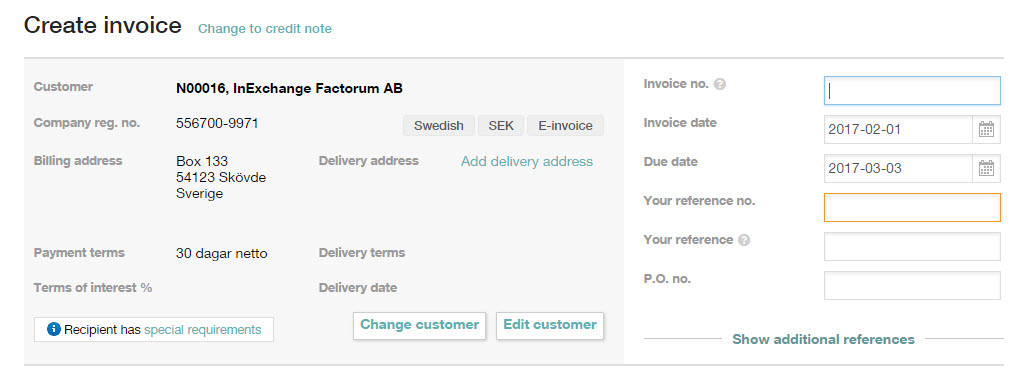
Invoice Number
You can choose between manual and automatic invoice number series. Here you can read more about how to make settings for this.
Customer and Delivery Method
If you have selected the wrong customer, you can easily change the customer by clicking the button Change Customer.
Change language, currency and delivery method
You can change the language, currency, and delivery method directly in the invoice view.
Language: Click Language and choose one of the following options:
Swedish, Danish, English, Finnish, Icelandic, or Norwegian.
Currency: Click Currency and select the desired currency, for example SEK, EUR, USD, GBP, or another option from the available list.
Delivery method: Click Change how the invoice will be sent and choose E-invoice, PDF, or Paper.
These settings apply to the current invoice and can also be saved as default values on the customer card.
Instructions for changing the delivery method:
Choose the best possible delivery method using InExchange Porto Optimization >>
References
If your customer requires a specific reference number, it should be filled in the field Your Reference No. The reference number can also be called Reference Code, Order Reference, Order ID, etc.
The appearance of the reference number may vary. Here are some examples:
YY01234
123456
Anna Andersson
Contact your customer to get information about the correct reference.
By clicking on Show More References, you gain access to more reference fields, settings for the invoice period, and more.
Through the help icons you always have access to quick help when you need it.